
Web Browser Guide for Bloggers

“Give a man a fish and you feed him for a day;
teach him to use the Net
and he won’t bother you for weeks.”
Anonymous
It’s strange that we spend more time talking about our blogging programs than we do the tool that uses those blogging programs, our web browser. The more connected our lives become to the web, the more reliant we become on the web browser to get us the information we need and use with as little effort as possible.
For the next few weeks, I’ll be doing a series called the “Web Browser Guide for Bloggers”, helping you learn more about how the browser works and how to make it work better for you as part of your blogging experience.
For some, this will be old news. You’ve been surfing the web for so long, the tips and tricks of browsing are totally unconscious steps you take to make the process smoother and faster. Many learned only enough to do what they needed to do and are stuck in a browsing rut. For others, it’s never too late for an old dog to learn a few new tricks. I’ll also be asking for your browsing tips and tricks along the way.
This web browser guide is designed to help you learn, step-by-step:
- How to use a web browser better.
- How to get your web browser to work better for you and your blogging needs.
- How to effectively search the web through your browser.
- Tips on how to use your browser to help you find content and write articles for your blog.
- How to use your browser to help you develop and administer your blog.
- And more about how to use your browser to make your blogging experience easier, more efficient, and more enjoyable.
Introduction to the Web Browser
Originally called the Internet Browser, the web browser is your gateway to the web. It is software that helps you navigate through the web.
The browser translates a web page’s underlying “language”, the code that creates a web page, into something you can see and read. It translates the instructions which turns codes into letters and symbols for different international languages, makes the font black, the background white, the post title red, places this graphic here and that image there, and puts the sidebar on the side and sets the size of each container on the page.
It also works with other codes and programming languages to make things happen like a Javascript, which makes a clock keep time or displays which phase the moon is in today on a web page. Today’s web browser does more than just translate and display. It initiates programs, tracks your progress through the web, allows you to easily retrace your steps or return to favorite blogs and sites, and includes a variety of features to enhance your web experience. There are also tons of add-ons and extensions you can add to your web browser to make it do even more.
 For a very long time, there have been two players at any one time in the browser market. Originally, Microsoft Internet Explorer (MSIE) and Netscape Navigator were neck and neck, and then Microsoft incorporated Internet Explorer into their operating system, so many users took it for granted that this was what they were to use. Since it was easy and available on their machine, why bother with anything else? Other browsers came and went, or held on for a small crowd of fans over time. Finally, Mozilla Firefox moved into serious competition against Internet Explorer (IE).
 While globally, Internet Explorer continues to hold the largest market share, Microsoft also recognized the growing interest and market threat from the free Firefox browser. The latest version of Internet Explorer now includes many Firefox features such as Tabbed browsing, heating up the competition.
The great thing about a browser war for market dominance is that if the companies are really listening to the needs of the user, we will win from the competition.
Which Web Browser Should You Use?
A mythology on the web is that you can only use one web browser on your computer. This is not true. Many believed the mythology that since Internet Explorer “takes over” much of your operating system, integrating itself within other programs, that another browser would do the same thing, replacing the familiar Internet Explorer.
A web browser is a program. Just like you can have three or more graphics programs, word processing programs, and other software installed on your computer, you can have more than one web browser. Have no fear about “replacing” Internet Explorer. Try other browsers to see if you like them, and if you do, keep using them, or go back to Internet Explorer. It’s still there.
Many worry that they will have to start learning how to use a new browser all over again. Don’t. Web browsers basically work the same, just some of the names might be changed.
Wikipedia offers a list of web browsers and a comparison of web browsers to help you determine which one might work best for your needs and operating system.
As this series continues, I will cover some of the similarities and differences between various browsers which may also help you decide which one will work best for you and your blogging needs, though I will focus mostly on Internet Explorer and Firefox, since they are currently the most popular.
Your Guide to The Web Browser Begins Tomorrow
Tomorrow, I will describe the important basic bits and pieces you need to be on a first name basis with on your web browser. As we go through this process though, understand that different browsers name these bits and pieces differently. For example, Internet Explorer has “Favorites” and Firefox uses “Bookmarks” to describe the same set of saved links for future reference. I’ll do my best to identify which browser uses which name for which part as we go.
Before tomorrow, get familiar with your browser’s menu bar, the bar at the top of your browser listing menu titles like File, Edit, View – no different from any other software program interface.

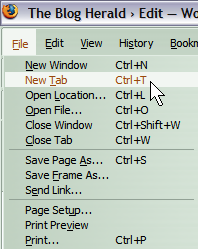 As you go through the menu bar, many commands and functions will list keyboard shortcuts on the right side of the menu item. Sometimes keeping your fingers on keyboard will help you work faster than taking your hand away to reach for the mouse. I use the CTRL+F key combination all the time to initiate a search on a web page. I use CTRL+T to open a new Tab throughout an average web-using day.
Identify which ones you use the most and their corresponding keystroke shortcut so you can take advantage of them, speeding up some of the redundant process you do. Also check the help files for a full listing of all your browser’s keyboard shortcuts and print it out as a guide.
Below the menu bar is your button toolbar, the visual buttons which are shortcuts to the functions and commands in your menu bar, including navigational aids such as back, forward, and home.
Look around your browser’s interface to identify the other toolbars, panels, parts and pieces and ask yourself what these things do. We will be discussing them, so take a moment to find them on your browser.
Many modern browsers do not display all of the features a browser offers by default. I’ve seen many browsers without an address bar, or the button toolbar missing. This enlarges the web page viewing area, but also removes some frequently used functions. Check the View > Toolbars to ensure that the navigational bars, status bar, and other toolbars are enabled so you can learn about how they work and how to make them work for you.
Also, learn how to access Help on your browser. For most browsers, there is a Help menu on the menu bar or the F1 key will bring it up. Today’s help files are much more helpful than they used to be, allowing you to not only read the guide on your computer but also to access web-based instructions and guides to help you understand more about how the browser works. Some include links to articles online to give you even more information on how to use your browser better. Check them out.
Whether you are reading blogs, searching for information on the web, or blogging, your entire web experience is through the browser, so why not learn more about how this gateway to the web works so you can get the most out of your online experience?
And trust me, understanding how your browser works will help you blog better. I promise.
Web Browser Guide Article Series
- Web Browser Guide for Bloggers
- Web Browser Guide: Exploring the Parts and Pieces of a Web Browser
- Web Browser Guide: Favorites, Bookmarks, and History
- Web Browser Guide: Button, Keyboard, and Mouse Shortcuts
- Web Browser Guide: Searching the Web
- Web Browser Guide: Searching the Web Tips
Lorelle VanFossen blogs about blogging and WordPress on Lorelle on WordPress and is the author of Blogging Tips, What Blogger’s Won’t Tell You About Blogging.

Home and End.
Explaining those two buttons, and why they should have been called Top and Bottom is probably the easiest way to make a life altering change to how people use their web browser.